Welcome on my personal blog.
If you are looking for information about Social, Digital marketing, Mobile & Cognitive technologies from IBM, you have come to the right place. Hope you will be able to find interesting info...
The posts are my own and don't necessarily represent IBM's positions.
Customer service today is largely made up of outsourced call centers, integrated voice response (IVR) systems that keep you away from a real customer service officer. Or you may think of webchat windows that pop up while you are surfing sites like amazon, offering to help answer any questions you may have.
With Polycom, customer service can now be Visual. More personal, more interactive and ultimately, more effective.
The RealPresence CloudAXIS allows you to upgrade an instant messaging conversation or question, to a face to face conversation with a customer service rep or subject matter expert – ensuring that customers that are researching online have instant answers. But also customers that are purchasing online, don’t leave a website to go to a competitor’s or just lose the motivation to buy.
Empowers video banking or visual customer service by delivering the trust, confidence and information a customer needs to progress the purchase of relatively complex products. Video collaboration can be initiated through a link sent via online chat message. It extends one of your front office channels to improve the customer experience and sales.
That demonstration will illustrate these principle via a fictional Banking Web Site which has implemented RealPresence CloudAXIS in their Banking processes.
A new release of RealPresence Content Sharing Suite (CSS) is now GA, with a cool new feature.
CSS, in it first release, is the Industry First Content Sharing Interoperability solution with Microsoft Lync 2010.
Imagine you have to join a meeting that someone or you have something to share content, but you don't have video endpoints or RealPresence Mobile or Desktop. You just have a Web browser
Now, you can with a new Web browser-based content access.
You can access CSS content over the Web by entering a special URL — https://<server IP>/css/ — in a Web browser. The URL will be specified in the meeting request. After you enter the URL in your Web browser, you can use the onscreen dialpad to dial the VMR, or you’ll be prompted to install or upgrade (if required) CSS software on your machine so you can dial the VMR and view and share content.
Use the onscreen dialpad to enter the VMR number and select Call to dial into the meeting.
Connection in progress to the VMR.
List of applications you can share.
You can share your content.
If a meeting participant is sharing content, you’ll automatically see the content on the Web page.
I have illustrated the power of Polycom infrastructure APIs in several articles in my blog.
I already showed you an example of VMR management via a desktop app (Java based).
I have tested the same kind of features via a simple Web browser. Because, Polycom APIs are based on REST, and a REST service is platform-independent.
That simple example retrieves VMR information associated to an end-user and I can update passcodes.
Since 2001, Java applets development and multiple Web browser, I hate to develop for Web browser... Today, I did lot of tests of Ajax calls, and I understand, one more time, why I continue to hate Web development...
I build a Web architecture to do Ajax calls on a REST server which doesn't support CORS. So I decide to implement an Apache Web server in reverse proxy with CORS headers.
Content of my httpd.conf: Header set Access-Control-Allow-Origin "*" Header set Access-Control-Allow-Methods: "POST, GET, OPTIONS" Header set Access-Control-Allow-Credentials "true" SSLProxyEngine On ProxyPass /api https://10.223.43.21:8443/api ProxyPassReverse /api https://10.223.43.21:8443/api
I'm doing a XHR call on my http server in proxy mode, it's work fine. But, I want to initiate the XHR call from a web page served via another web server.
Yesterday, Polycom made history...
We have made four industry-transforming announcements.
New endpoints & New User Experience,
Open SVC standard,
New Portfolio of Mid-market Solutions,
RealPresence Axis Suite.
I would like to spend more time on CloudAxis, whis is truely AWESOME...
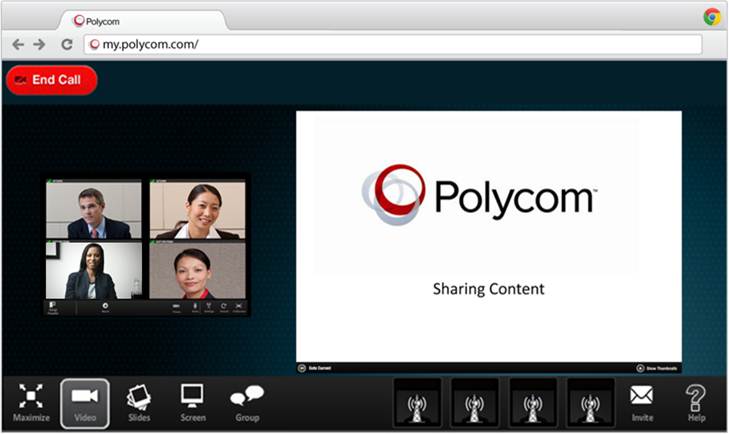
CloudAxis Suite is a new product that extends enterprise- grade video collaboration to Skype, GoogleTalk, and business video apps through a browser: making B2B and B2C collaboration possible. That's important, because it enables organizations to collaboration outside their firewalls, easily with their Business Partners and Customers.
Via an universal browser access, without specific download, end-users will be able to join a collaboration session with you... That platform will be the first industry Global Presence Directory to agregate presence and adress list from Skype, GoogleTalk, Facebook, Microsoft Lync, IBM Sametime and other presence apps...
Now, let me share some screenshots to share with you the user experience.
Host can start a call and invite those contacts from the global directory.
Invitees receive link in Chat Window and launch their browsers.
Secure Multipoint Video Session
Participant View with Content Sharing.
To sum up, that new offering will allow you as Polycom customers to extend enterprise-grade video collaboration from rooms, theaters, desktops, tablets and smartphone to billions of users on any presence video app, any brower, any device...
The fixpack AORN-8SUKPR provides you an new capability I have used in my two previous blog entries. The ability to have a Video chat-enabled through a simple Web page.
The normal way to have access to a online meeting through Web is to use an url formatted like that: [Hostname] +"/stmeetings/room/" + roomInformation.owner + "/" + roomInformation.permaName
In my example, I have typed in my preferred internet browser this url : http://meeting.ibmuc.lab:9081/stmeetings/room/vincent.perrin@polycom.com/webav
The result, in that case, is:
The fixpack introduces a new parameter "?community=true".In that case, you will only see the video-chat in your web page. My new url is: http://meeting.ibmuc.lab:9081/stmeetings/room/vincent.perrin@polycom.com/webav?community=true
The result, in that case, is:
You don't have access to other meeting capabilities like screen & content sharing, library...
Interesting thing: Video will automatically start... :) :) That's great and really easy to use...
Undocumented REST APIs are also available in the fixpack to create a meeting room, retrieve room information...
OriginType: Used to indicate from where the room originated OriginID: Used to store an associated ID for the room, when the room originated from some
other source to be used with originType. isDisposable: Indicates whether or not the room is a disposable, instant meeting room. conferencingInfo: a JSON-formatted string representing the A/V conferencing info for the
room. In the case of that fixpack, the code uses a file named serviceprovider.json. Room Information:
GET method with this url: http://meeting.ibmuc.lab:9081/stmeetings/restapi?originId=WebAV&originType=WebAV
JSON response:
"Web is the platform": The web has changing the way people interact with others, find information, buy new products, consume information... Every companies in the world have a corporate intranet, an external B2B/B2C web site.
Video is also becoming a new language of business. 576 million video calls in the last year (Business & Consumer)..
Some organizations have deployed live chat system for their extranets, which is good to interact with customers or partners in real-time, but for "Gold" customers or to create more intimacy.
Video is a best channel of communications. Remember, only 7% of information is sent through words, the remaining 93% of communication is non-verbal.
Video & Online Banking
The concept of Internet banking has been simultaneously evolving with the development of the world wide web. Imagine a bank agent will to exchange with one of his customer on a tough subject. Chat or audio is not enough. Some banks have already integrated video into banking kiosks linked to their centralized video call center to improve efficiency and productivity of their employees.
Customer interaction - Product Support
The same approach can be used to interact with customers about new products, to support product installation, troubleshooting...
In these two examples leverage Polycom Realpresence and IBM technologies.
By adapting the widget provided by "IBM Sametime Video Chat Plug-in for IBM Connections", you can include a button, a link in any web page.
In a previous blog entry (here), I have introduced "IBM Sametime Video Chat Plug-in for IBM Connections".
We just did first tests this afternoon with Fabrice Duband (IBM La Gaude UC² CoE), Karl Lawall (IBM WW Social Business Sales) and John-Pierre Campitelli (IBM Collaboration Solutions Solution Representative in Italy).
With that integration, directly from an IBM Connections platform, you can start a Polycom video session with all community members.
By leveraging Polycom Realpresence RMX, you can see, at the same time, all attendees.
First, 3 members:
And then, 5 members:
Everything is delivered through a simple Web interface via IBM Sametime WebPlayer.
That's fantastic !!! A good example of Social Communications & Video ubiquity...
The latest release of LotusLive is now available... with lot of new features.
As you can see the TwitterSphere is already in turmoil...
A list of some new features in LotusLive Notes (more details):
Free 60-day self-service trial
BlackBerry smartphone management improvements
Integrated instant messaging for LotusLive Notes web
Trash folder management
Adding external names to a group
Email filters
Revoking a LotusLive Notes user account
Mail file transfer over FTP
My prefered feature : Lotuslive Notes Web Access with on-premises community.
In LotusLive Engage or Connections :
A new integrated application is available: Trilog ProjExec Live. ProjExec Live enables project managers to create, plan, execute and track projects using a professional Gantt editor that synchronizes with Microsoft Project. Invite other LotusLive users as project members and collaborate securely using a multi-project activity stream called the Project Wall. ProjExec Live is an intuitive, mobile-friendly solution to effectively manage and deliver projects of any size.